 FluxTime
Everything FluxTime does, in one place.
FluxTime is four screens that work as one loop. Vision holds your goals, Today holds the plan, Journal holds what actually happened, and Review shows the pattern. Flux AI works across all of them.
iPhone, iPad, Mac & Apple Watch/Free to download/English & 中文
Set the direction
Goals, projects and todos, with progress measured in hours.
02 / TODAYPlan the day
Tasks and events on one timeline, with time you've protected.
03 / JOURNALLog what happened
One line per switch. No timer to start or stop.
04 / REVIEWSee the pattern
Where the time went, and whether your goals are on pace.
Turn a big goal into this week's todos.
Vision is where direction lives. Break each goal into projects and todos, estimate the hours, and watch the time you log move it forward. A marker on every progress bar shows where you should be by now.
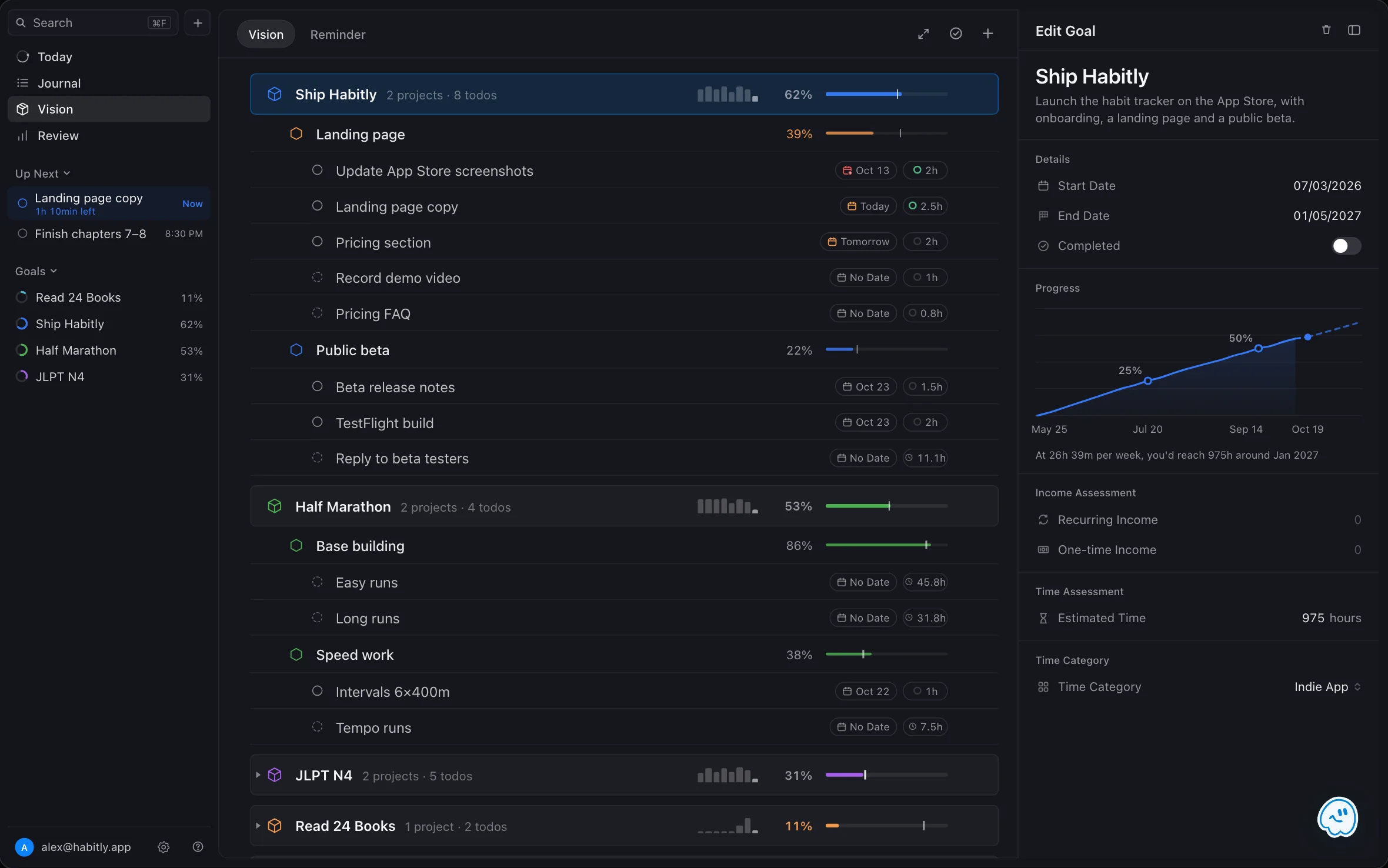
Goals, projects, todos
One outline for the whole plan, with dates and hour estimates at every level.
Progress in hours
Logged time counts toward the goal it belongs to. Fall behind pace and the bar turns orange.
Workflows and reminders
Reuse multi-step workflows for projects you run again, and keep repeating reminders beside your goals.
Plan the day on a real timeline.
Today puts tasks, calendar events and reminders on one timeline. Block out time you want to protect, draw your work hours, and let Plan my day fit open tasks into the time you really have.
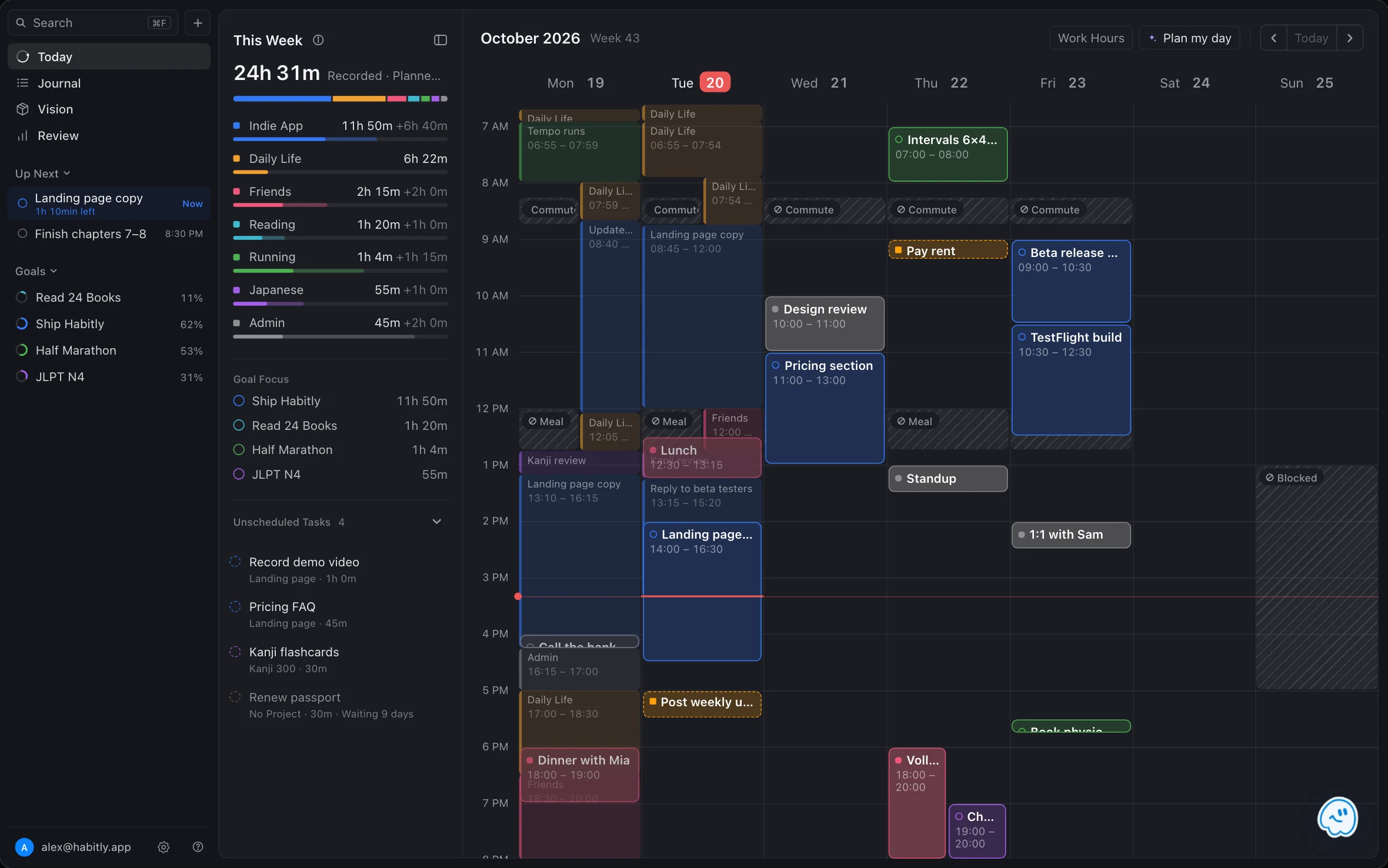
Time blocking
Drag tasks into free slots, move and resize them, and block off meals, commutes and breaks.
Plan my day
Ranks open tasks by urgency, impact and goals, then shows every proposed move before you apply it. Flux Pro.
Unscheduled, Up Next, This Week
Park tasks without a time, see what's on now, and check how the week is filling up.
Log your day without starting a timer.
Journal records what actually happened. Write one line whenever you switch to something new; each entry runs until the next one, so the day turns into time blocks on its own. Tag it with a category or a todo and it counts toward your goals.
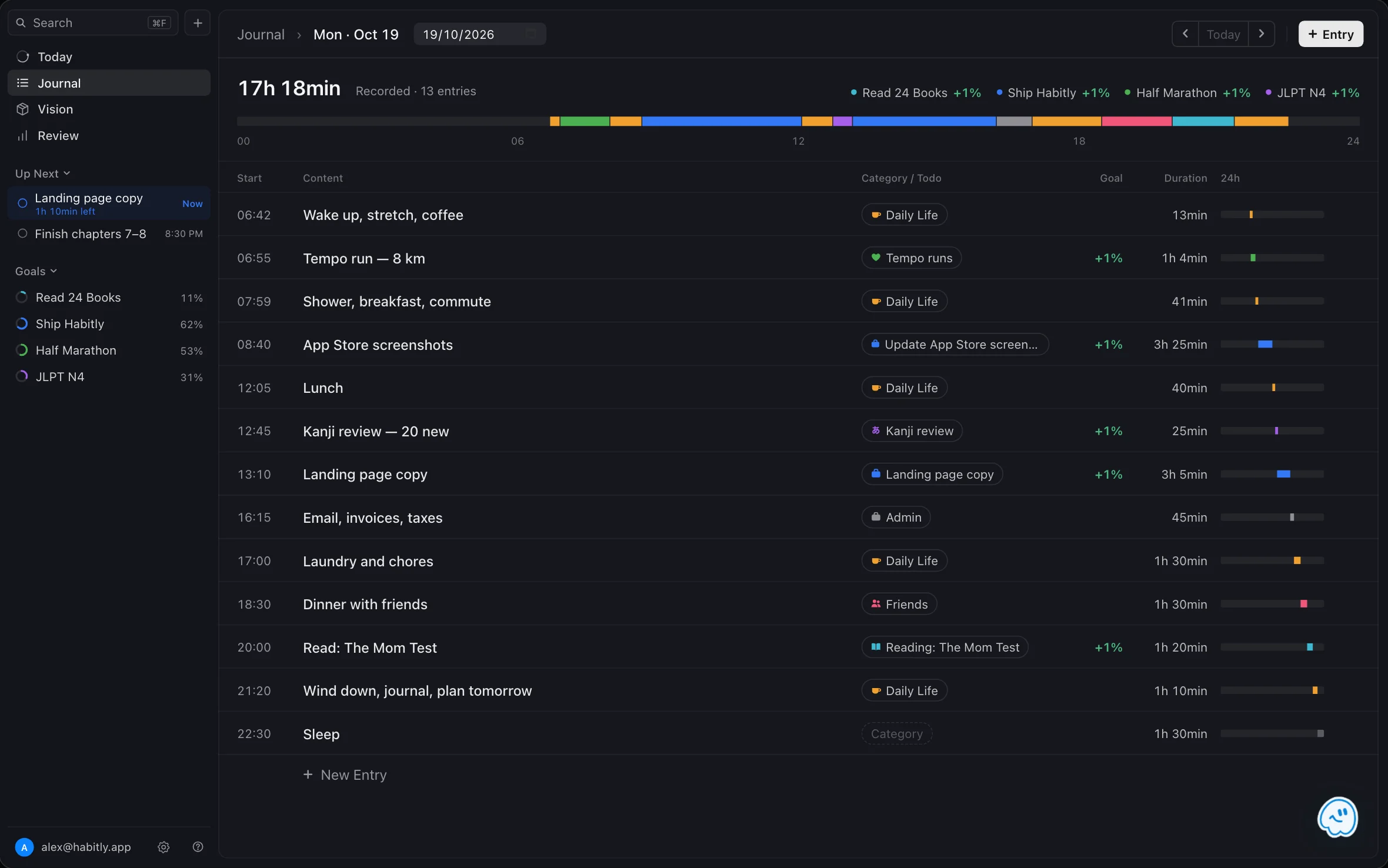
One line per switch
No stopwatch to start or stop. Fix a time later by typing it, like 1845 or 6:45pm.
Log from anywhere
A Quick Log shortcut on Mac works from any app, and Apple Watch logs a template with one tap.
Plan and reality together
Recorded time shows on the Today timeline behind your plan, so you can see where it held.
See where your time actually goes.
Review turns your journal into answers: time by category against last period, goal pace with a finish-date forecast, and a year of logging streaks. With Flux Pro, add the Energy Curve, Weekly Balance and category trends.
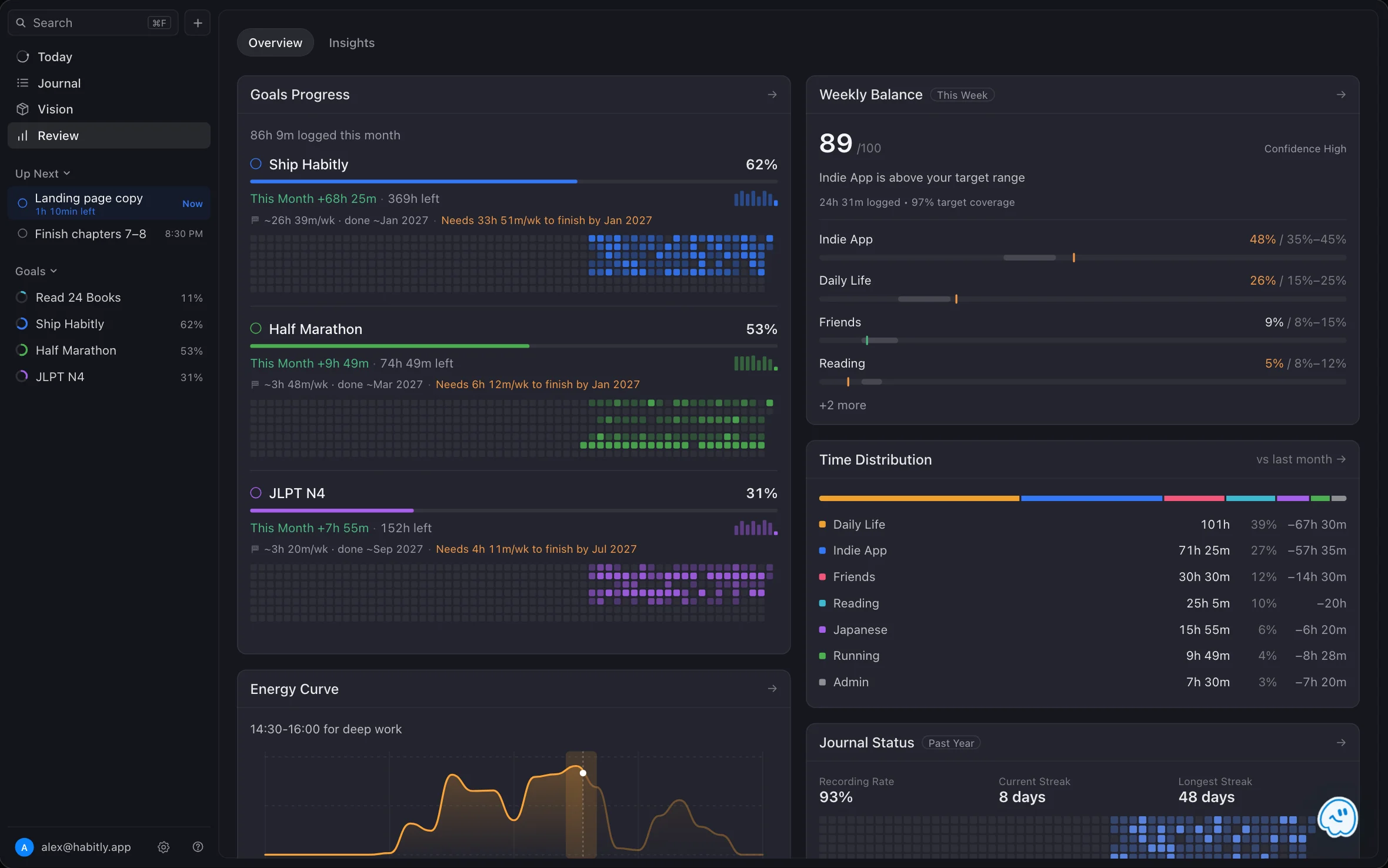
Time distribution
Every category's hours and share, with the change from last week, month or year.
Goal forecasts
How many hours are left, your recent weekly pace, and when you'll finish at that pace.
Your own insights
Ask Flux AI for a chart Review doesn't have, then keep it under Review → Insights.
An assistant that reads before it answers.
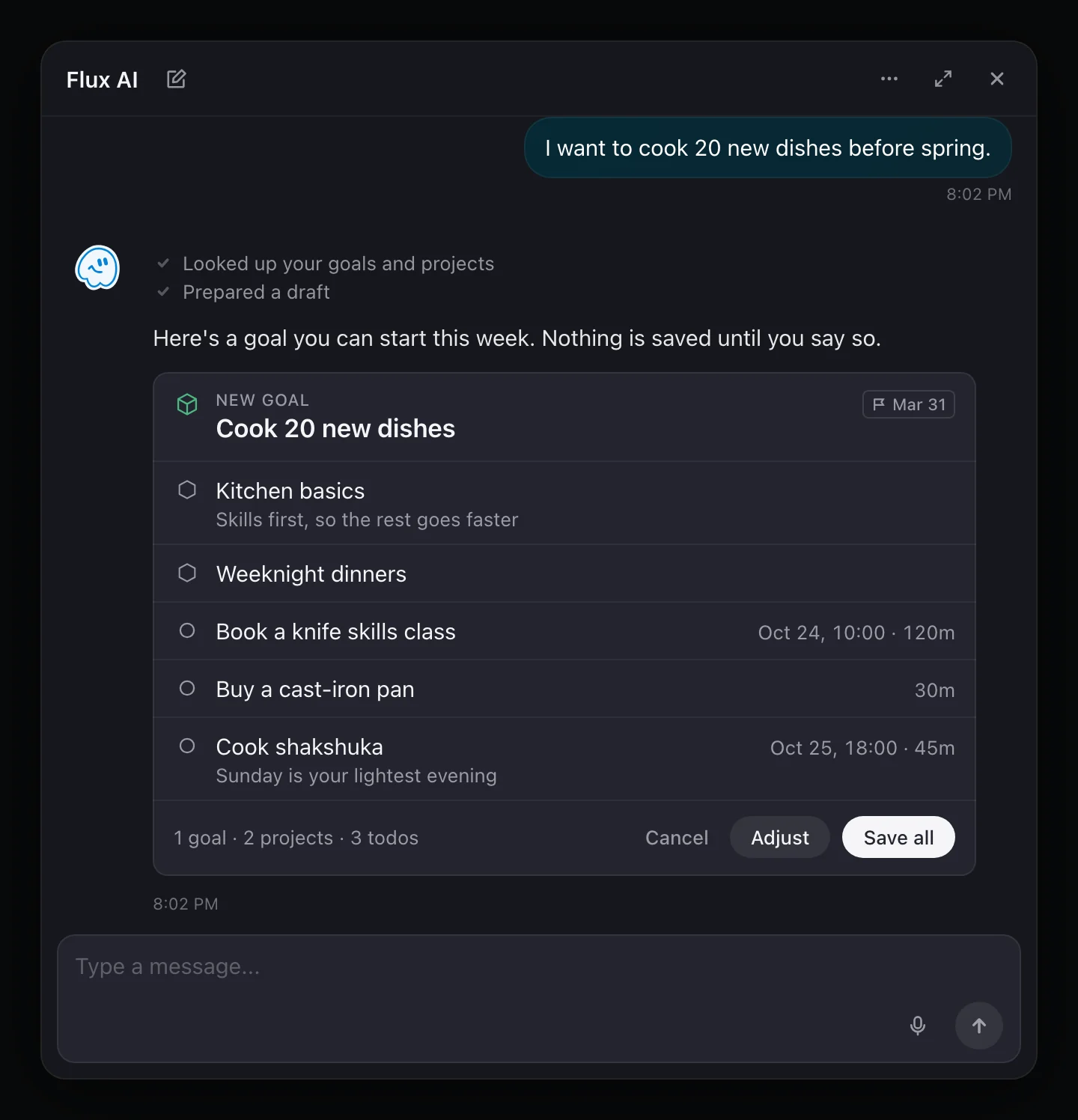
Flux AI looks up your goals, tasks, schedule and journal, then answers with a draft: new times for what no longer fits, a goal broken into projects and todos, or a chart of your own data. Nothing is saved until you approve it, and nothing is sent until you allow AI data sharing.
- 01Rearrange the day when it falls apart
- 02Turn an idea into a goal you can start this week
- 03Ask about your time and keep the chart in Review
- 04Use Claude? Connect FluxTime and ask it about your data, read-only
Built for the Apple devices you already use.
FluxTime is a native app on iPhone, iPad, Mac and Apple Watch, with widgets for your Home Screen and desktop. Sign in with Apple, and use it in English or Simplified Chinese.
iPhone & iPad
The full app on both. iPhone shows one to three days at a time; iPad shows the week with both sidebars.
Mac
Open pages as tabs, switch with ⌘1–9, and split the window so today's plan sits next to your journal.
Apple Watch
Tap a template to log it, dictate or scribble anything else, and add FluxTime to your watch face.
Widgets
Goal Progress and a Journal heatmap on your Home Screen or desktop; Energy Curve and Goal Activity with Flux Pro.
Free to start. Pro when you want more.
FluxTime is free to download, and the core loop works without a subscription. Flux Pro adds smart planning, deeper Review, unlimited Flux AI and sync across devices.
- ✓Today timeline, time blocks and work hours
- ✓Journal, Apple Watch logging and Mac Quick Log
- ✓Vision goals, projects, todos, workflows and reminders
- ✓Review time distribution, goal forecasts and Journal Status
- ✓Flux AI, a limited number of messages a day
- ✓Export to CSV and JSON
- ✓Plan my day (smart day planning)
- ✓Unlimited Flux AI
- ✓Energy Curve, Weekly Balance, Category Trends and Goal Activity
- ✓Energy Curve and Goal Activity widgets
- ✓Cloud sync and backup across devices
- ✓Apple Calendar integration
- ✓Your data in Claude through MCP, read-only
Connect your time to the goals you care about.
Download FluxTime free and bring goals, plans, time and reflection into one rhythm.
Get FluxTime free