 FluxTime
A weekly review is a short, regular look back at the week so you can plan the next one on purpose. David Allen made it the keystone habit of Getting Things Done, and the idea has spread well beyond GTD because it fixes a common problem: weeks that feel busy and leave no trace.
Most weekly review templates start with questions like "What went well?" The trouble is that memory is a poor witness. The week you remember is the meetings that ran over and the one big win, not the six hours that leaked into email. This version starts with a record of what happened, then asks the questions.
What you need
- Thirty minutes at the same time each week. Friday afternoon closes the week while it's fresh; Sunday evening sets up Monday. Pick one and keep it.
- A record of the week. A time log, a calendar you actually kept up to date, or a notebook. Anything that shows where the hours went instead of where you planned them to go.
- Your goals and your task list, so the plan you make has somewhere to go.
If you have no record yet, run a one-week time audit first. Your first review will be far more useful.
The 30-minute weekly review checklist
1. Look at the numbers (10 minutes)
Before you judge anything, read the week:
- Hours by area. How much went to work, health, people, learning, rest? Compare with last week, not with an ideal.
- Goals. Which goals got time, which got none, and is each one moving fast enough to finish when you want it to?
- Rhythm. Did the week look the way you meant it to? If you'd hoped for about a third of your time on deep work and got a sixth, that's the headline.
Write down two or three things that surprised you. Those are what the rest of the review is about.
2. Answer seven questions (10 minutes)
Keep the answers short. One line each is enough.
- What did I finish this week that mattered?
- Where did the most time go, and was that worth it?
- Which goal didn't move, and why?
- When did I do my best work? What was different about those hours?
- What took longer than I planned?
- What drained me that I could drop, delegate or shorten next week?
- What's the one thing that would make next week a good week?
3. Clear and plan (10 minutes)
- Empty the inboxes. Notes, captured tasks, open loops in your head. Each one gets a home, a date or the bin.
- Pick next week's few priorities. Three is plenty, and question 7 is usually the first.
- Give them time on the calendar. A priority without a slot is a wish. Put each one into the hours that suit it, ideally your best ones.
That's the review. If it runs long, cut the questions before you cut the numbers or the plan.
A weekly review template you can copy
Week of: ___
Hours: work ___ · health ___ · people ___ · learning ___ · rest ___ (vs last week: ___)
Goals that moved: ___ Goals that didn't: ___
Surprises: ___
The seven questions: ___
Next week's three priorities, with when: ___
Doing your weekly review in FluxTime
FluxTime keeps the record for you, so step 1 takes a couple of minutes instead of ten.
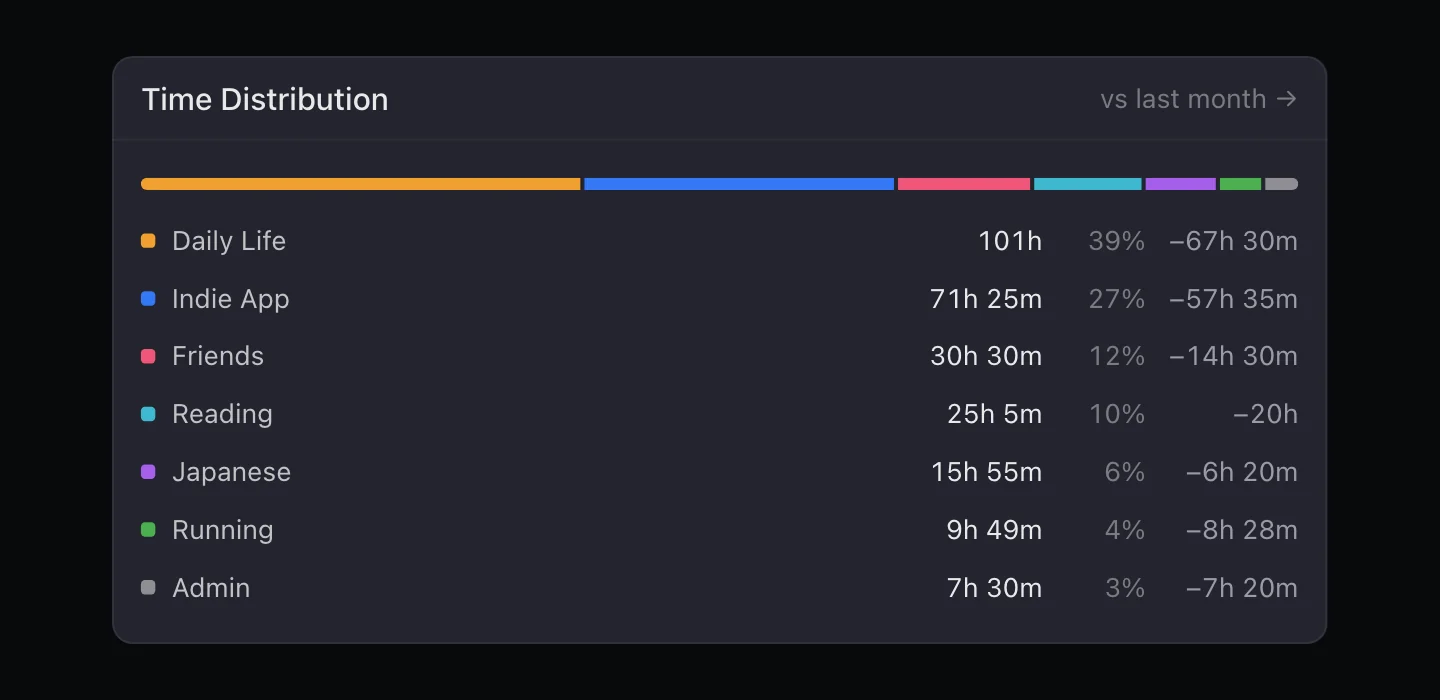
- Hours by area. In Review, open Time Distribution and switch it to Week: every category's hours and share, with the change from last week. Today's This Week panel also shows recorded time by category next to your average, from the daily planner.
- Goals. Goals Progress shows how much time each goal got, its pace over the last four weeks, and whether it's on track for its end date.
- Rhythm. Weekly Balance scores the week against the share you set for each category and names the ones that are out of range. It's part of Flux Pro.
- Best hours. The Energy Curve shows when your days usually run high and suggests a 90-minute deep work window. Also in Flux Pro; see how to track your energy.
- A second opinion. Tap Review my week in Flux AI to ask where your time went this week; it answers from your journal.
Then plan in Today: block time for next week's priorities, starting with your best hours. The time tracking page shows everything Review can tell you.