 FluxTime
A big goal rarely fails on the day you set it. It fails a few weeks later, on an ordinary evening, when you sit down with an hour free and can't say what to do next. "Run a half marathon" or "launch the app" is a result, not an action, so it never makes it onto the calendar.
Breaking a goal down fixes that. The method below works on paper; the last part shows how to set it up in FluxTime's goal planner.
Use three levels, not one long list
A single list of tasks under a goal gets long fast, and it hides which parts are nearly done. Three levels keep it readable:
- Goal: the result you want, with a start date and an end date. Run a half marathon by March 14.
- Project: a piece of the goal you can finish and cross off. Base building. Speed work. Race prep.
- Todo: a step small enough to do in one sitting, with a rough time estimate. Intervals 6×400m, 1 hour.
The test for a todo is simple: could you start it right now, without first deciding what it means? "Work on the landing page" fails. "Write the hero copy, 90 minutes" passes. Use a specific verb and an end point.
The test for a project is that it can be done. If it never ends, like "stay fit", it's an area of your life, not a project, and it probably belongs in a habit or a recurring reminder instead.
Put hours on the plan
Counting finished todos is a poor measure of progress. Ten todos can be ten minutes each or ten days each. Hours are a better unit, because hours are what you actually spend.
Give each todo a rough estimate, and each project and the goal an estimate too, or let them add up from the todos. The numbers will be wrong at first. That's fine; they only need to be good enough to answer two questions:
- Does this fit? A 120-hour goal over 26 weeks needs about 5 hours a week. If your weeks are already full, you know before you start, not in February.
- How far along am I? 40 hours logged of 120 is a third of the way, whatever the todo count says.
Turn the dates into a pace
With a start and end date, you know how far along you should be on any day. Halfway through the dates, you should be about halfway through the hours. Compare the two once a week:
- On pace or ahead: keep going, and don't add work just because you can.
- A little behind: schedule one extra session this week, or move something smaller out of the way.
- Far behind for weeks: the estimate or the date was wrong. Change one of them on purpose instead of quietly giving up on the goal.
The point of the pace check is timing. Finding out you're behind in week 6 leaves room to catch up. Finding out in week 24 doesn't.
Only schedule the next few todos
You don't need to put every todo on the calendar on day one. Plans that far out break as soon as the first week goes differently. Instead:
- Pick the next two or three todos for each active goal.
- Give them real times this week, next to your meetings and other commitments.
- Leave the rest unscheduled until a slot opens up.
When a project has a fixed order, like a release that goes notes → beta → submit, write the steps as stages and only pull in the next stage when the current one is done. That keeps the list honest about what is actually possible right now.
Doing it in FluxTime
FluxTime's Vision view is built around these three levels (step by step in the docs). You add a goal with its dates, projects under it, and todos under those, each with an estimate. The outline shows every goal's progress as logged hours against its estimate, with a marker for where the dates say you should be; a goal that trails that marker by more than five points turns orange.
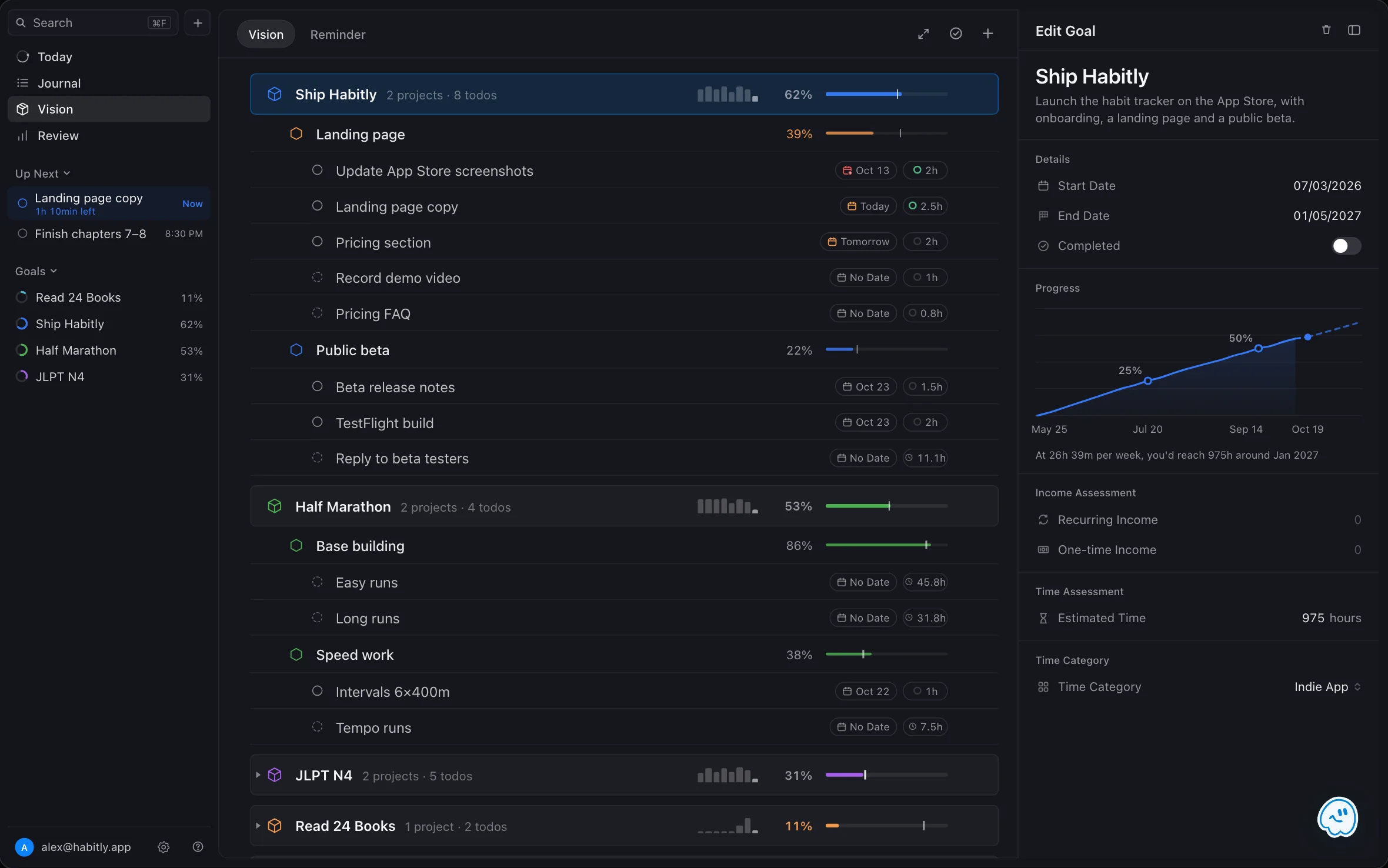
Progress comes from your journal. When you log time under the goal's category, or link an entry to one of its todos, the goal moves. On iPad and Mac, opening a goal shows its cumulative hours and when you'd reach the estimate at your pace over the last four weeks.
Todos without a time wait in the Unscheduled tray in Today, where you can drag one onto the timeline when a gap opens. For projects with fixed stages, a workflow creates the next stage's todos only when the current stage is finished.
If you'd rather not do the breakdown by hand, describe the goal to Flux AI and it drafts the goal, projects and first todos for you to review before anything is saved.
A short checklist
- Write the goal as a result with a start and end date.
- Split it into 2–5 projects that can each be finished.
- Write todos you could start right now, with a time estimate.
- Add up the hours and check they fit your weeks.
- Schedule only the next few todos.
- Once a week, compare hours logged with where the dates say you should be.