 FluxTime
A time audit is a week of writing down what you actually do, then adding it up. It sounds like bookkeeping, and it mostly is. The payoff is that it replaces your guess about where the hours go with a record, and the two are rarely the same.
This guide covers the whole loop: choosing the week, choosing the categories, logging without a timer, and reading the result. You can do it on paper. The FluxTime notes show how the same steps work in the app's time log.
What a time audit is, and what it isn't
A time audit is observation first, judgement later. For one week you record what happened, including the twenty minutes of email you didn't plan and the meeting that ran long. Only at the end do you decide what to change.
It is not a productivity score, and it is not a plan. People often start trimming their day by the second morning, which quietly turns the audit into a diet and leaves you with a record of your best behaviour instead of your normal week.
Before you start: pick the week and the categories
Pick an ordinary week. Not the week before a launch, not a holiday week. An unusual week gives you accurate data about something that rarely happens.
Pick five to seven categories and keep them fixed for the whole week. Fewer and everything lands in "work". More and you spend the week deciding which box a task belongs in. A set that works for many people:
- Deep work (the work only you can do)
- Meetings and calls
- Admin and email
- Health and exercise
- People (family, friends)
- Daily life (meals, chores, commuting)
- Rest
If one category matters more than the rest, split it. "Deep work" can become two projects if the point of the audit is to see how your time divides between them.
In FluxTime: create the categories once in category management. They can nest, so "Deep work" can hold one sub-category per project, and each has its own color, which is what makes the day readable at a glance later.
Days 1–7: log at every switch, not at the end of the day
The most common way an audit fails is reconstruction. At 10 p.m. nobody remembers whether the afternoon slump was twenty minutes or an hour, so the gaps get filled with what you meant to do.
Instead, write one line each time you switch to something new:
- The time.
- What you're starting, in a few words.
That's it. You don't need to note when the previous thing ended, because it ended when the next one began. Duration falls out of the gap between two timestamps. This is the same move as interstitial journaling, used here for measurement.
A few rules keep the log honest:
- Log the switch, not the plan. If you sat down to write a proposal and spent forty minutes in Slack, the entry is Slack.
- Classify by main intent. A walking call is a call. Lunch with a colleague is people or work, depending on why you went.
- Late is fine; invented is not. If you forget, log it when you remember and correct the start time.
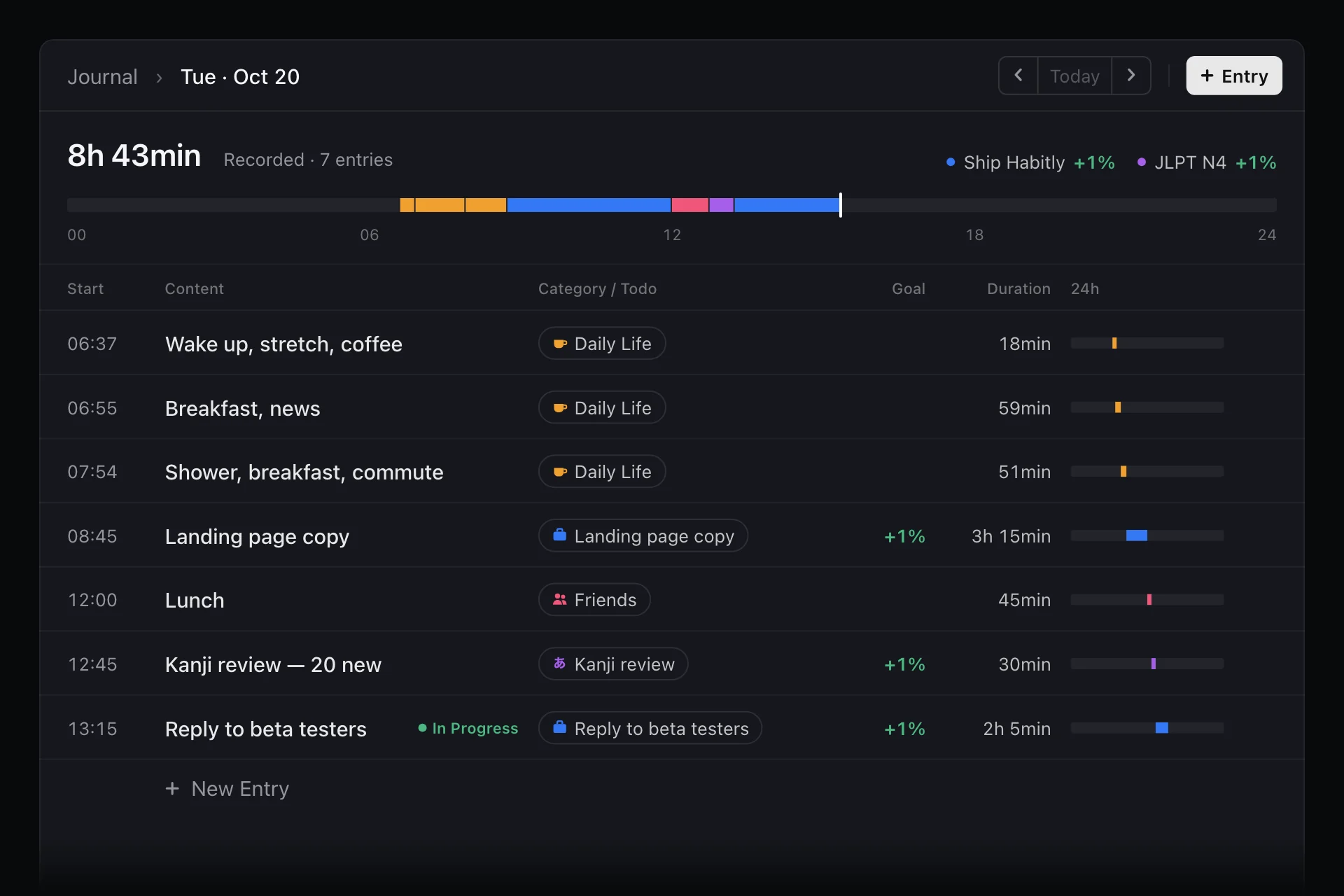
In FluxTime: each Journal entry starts when you log it and runs until you log the next one, so the day turns into time blocks without a stopwatch. On Mac, the Quick Log shortcut opens a log bar over any app; on Apple Watch, a template logs with one tap. If you log late, change the start time: on Mac you can type it as 1350 or 1:50pm.
Each evening: two minutes of tidying
Spend two minutes at the end of each day, not to reconstruct it, just to tidy:
- File anything uncategorized. Do it while you still remember what "call w/ S" was.
- Look for holes. A long entry that obviously covered two things can be split.
- Don't edit for flattery. The scroll through social media stays in the log.
In FluxTime: the band at the top of each day shows the whole 24 hours in category colors, so an uncategorized stretch or a three-hour "email" block stands out. Tap an entry's category to file it, or choose Split this interval to divide it in two.
Day 7: read the totals
Now add it up. For each category, total the week and work out its share of the hours you recorded. Then look at the week from a few angles:
- What surprised you? The gap between what you would have guessed and what you recorded is the main finding. Write it down before you explain it away.
- Where is the fragmentation? Many short entries in a row usually mean interruptions. A single 25-minute entry between two meetings is rarely deep work, whatever it's labelled.
- When does each category happen? Totals tell you how much; the daily timeline tells you when. Deep work squeezed into the evenings is a different problem from deep work missing entirely.
- What did the week get you? If your categories map to goals, check which goals actually got time.
If you also want to know when you have the most energy for each kind of work, the energy audit adds an energy score to the same daily check-ins.
In FluxTime: Review's Time Distribution card totals each category for the week and compares it with the week before. For your own spreadsheet math, Settings → Data → Export → Time Entries gives you a CSV with every entry's start, end, duration, note and category.
Turn the audit into one change
An audit that ends with a list of twelve resolutions usually changes nothing. Pick one change that the numbers clearly support, try it for a week, and keep logging so you can see whether it worked:
- If deep work only ever happens in fragments, protect one long block a day and put it on the calendar. Time blocking is the simplest way to do that.
- If meetings take more than you'd agree to out loud, decline or shorten one recurring meeting.
- If admin leaks across the whole day, batch it into one or two fixed slots.
Then run the audit again in a month. The second one is quicker, because the habit of logging at each switch is already there.
Common mistakes
- Auditing an unusual week. You'll fix a problem you rarely have.
- Too many categories. If you hesitate over where something goes, merge two of them.
- Logging from memory at night. It produces the week you meant to have.
- Changing behaviour mid-audit. Observe first, then decide.
- Stopping at the totals. The point is the one change, not the chart.
FAQ
How long should a time audit last? One full, ordinary week is enough to see a pattern, because it covers every weekday and a weekend. Two weeks is better if your weeks vary a lot.
Do I need to track every minute? No. Log each switch; small gaps don't change the totals much. What matters is that the big blocks are honest.
Should I use a timer? You can, but timers fail in a specific way: one missed start or stop and the entry is wrong. Logging only at each switch means there's one action per change instead of two.
Is a time audit the same as a time log? A time log is the record. A time audit is what you do with a week of it: total it, read it, and change something. FluxTime's time log is the record; the audit is up to you.