 FluxTime
Turn a big goal into this week's todos.
FluxTime's goal planner breaks each goal into projects and todos with dates and hour estimates. The time you log moves it forward, and a marker shows where you should be by now, so you notice a slipping goal while there is still time to catch up.
Goals → Projects → Todos/Progress in hours, not checkboxes/iPhone, iPad & Mac
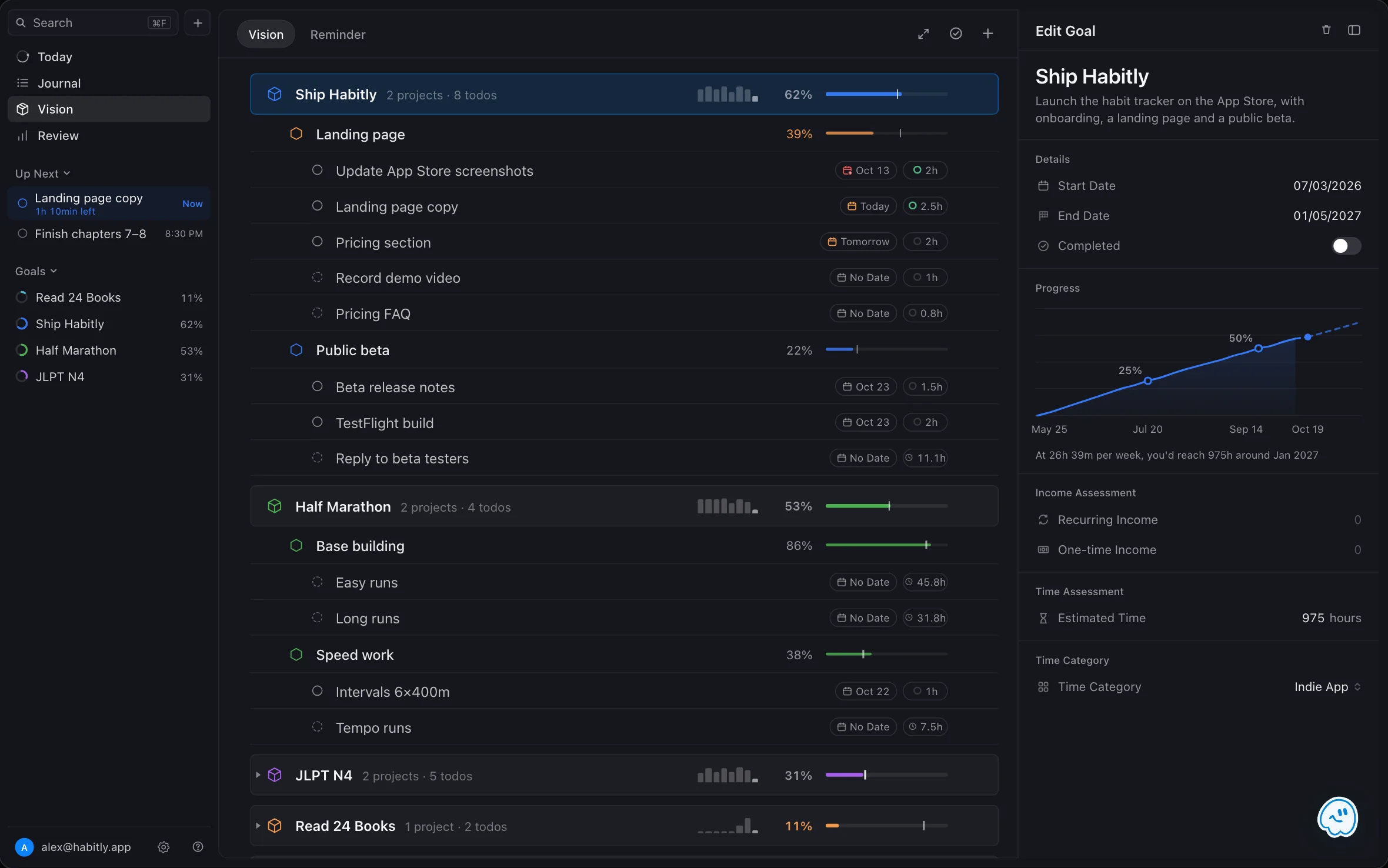
Goals, projects and todos in one outline.
A goal is the result you want, with a start and end date. Projects are the pieces you can finish. Todos are the steps small enough to do in one sitting, each with a date and an estimate. Vision keeps all three in one outline, so the reason behind every todo is one line above it.
Goal → project → todo
Expand a goal to see its projects, and a project to see its todos.
02 / ESTIMATEPut hours on it
Estimate a goal, a project or a todo. Empty estimates add up from below.
03 / SCHEDULESend todos to Today
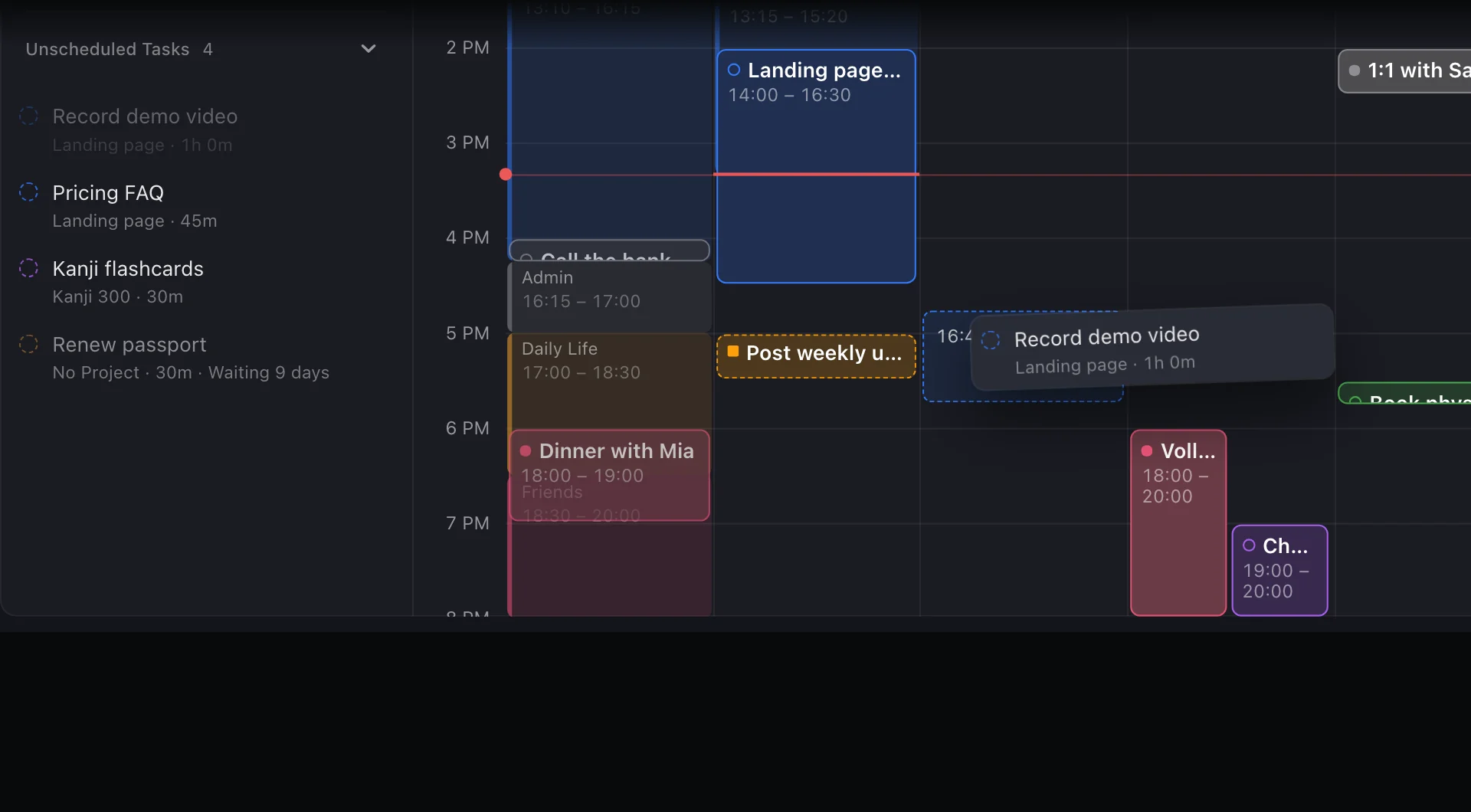
Todos without a time wait in Today's tray until you drag them in.
04 / TRACKSee if you're on pace
Logged time against the estimate, and against the calendar.
Dense on purpose
Every row lines up its percentage and bar, so a dozen goals still read at a glance.
Done stays out of the way
Completed projects and todos are struck through, and one button hides them.
Expand or collapse it all
Open every goal to plan the week, or collapse them to see only where each one stands.
Progress you earn by spending time, not by ticking boxes.
A goal that is "4 of 10 tasks done" can be nowhere near finished. FluxTime measures progress as the hours you have logged toward a goal against the hours you estimated for it. Write a journal entry under the goal's category, or link it to one of its todos, and the goal moves.
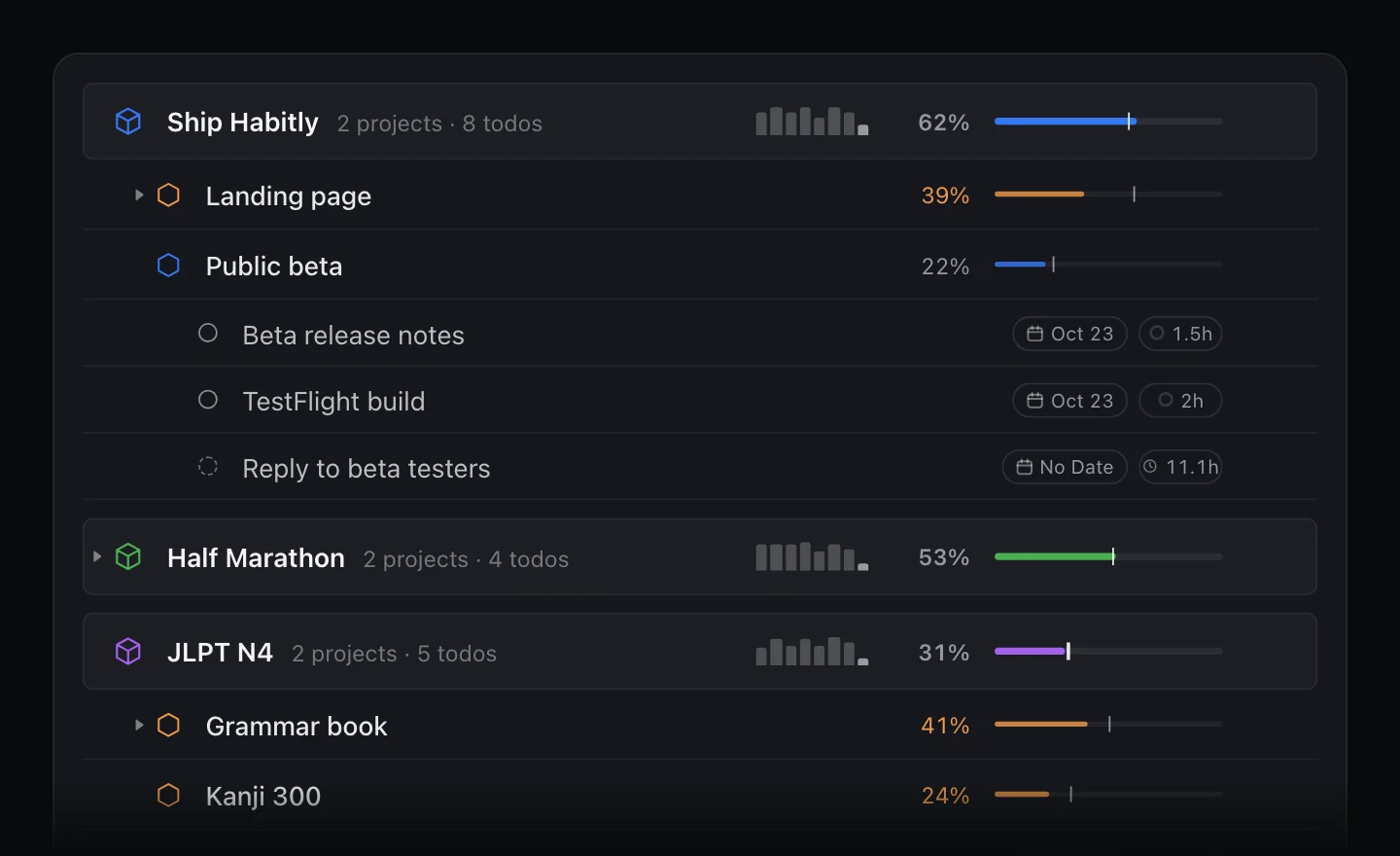
- 01Percentage: logged hours against the estimate
- 02Marker on the bar: where the dates say you should be
- 03Sparkline: hours per week over recent weeks
Know you're behind while there's still time.
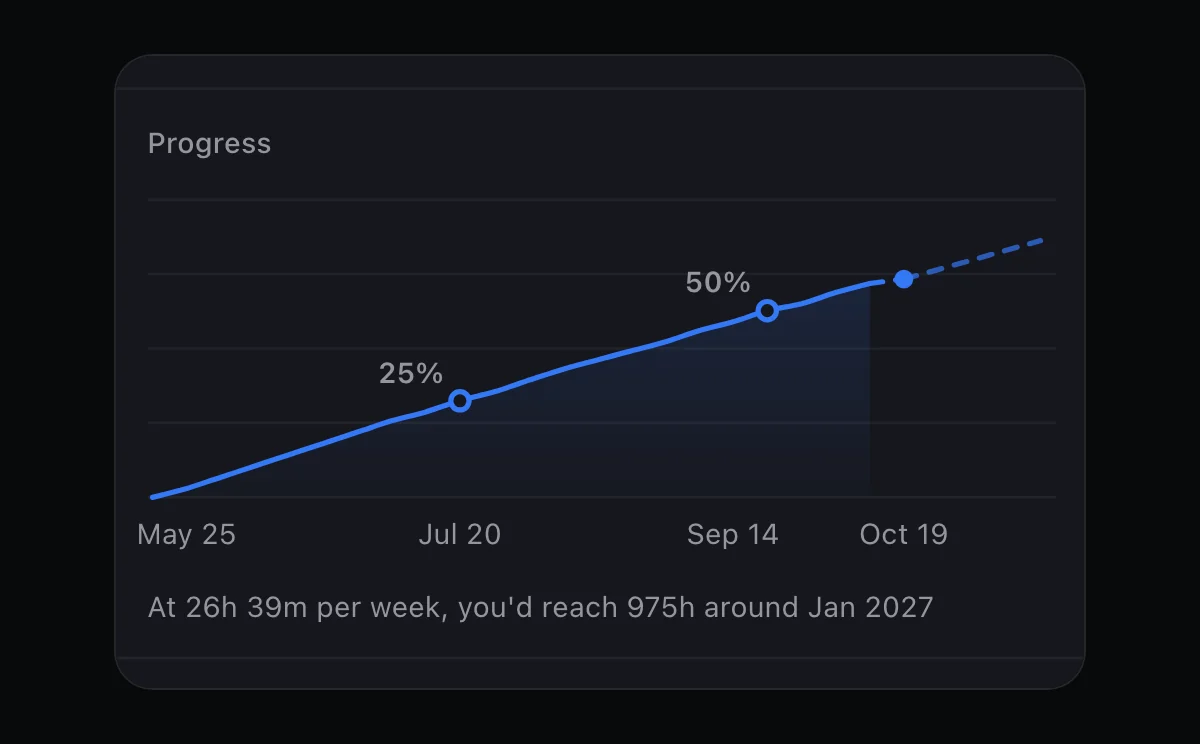
Give a goal a start and an end date, and FluxTime knows how far along it should be today. When the hours you've logged trail that by more than five points, the percentage and bar turn orange. Open a goal on iPad or Mac to see its cumulative hours, the milestones it has passed, and when you'd reach the estimate at your pace over the last four weeks. Review shows every goal's pace side by side; see time tracking.
- 01Expected progress from the goal's own dates
- 02Orange when you trail it, green when it's done
- 03A finish date at your recent pace, on iPad and Mac
A goal is only as real as the next slot on your calendar.
Todos you haven't given a time wait in the Unscheduled tray in Today, with their project and estimate. Drag one onto the timeline when a gap opens up. Plan my day goes further and fits open tasks into your free time, ranked partly by the goals they serve.
Dates or no dates
Give a todo a time in Vision, or leave it unscheduled and place it later in Today.
Not yet, on purpose
Delay a todo until a later date and it stays out of planning until then.
Plan my day Pro
Fits open tasks into free time around events and time blocks. See the daily planner.
Build the projects you repeat once, then reuse them.
Some projects happen again and again: a release, a client onboarding, a monthly report. Lay one out as a workflow on a canvas, with stages from left to right and parallel steps stacked in the same column. Use it, and FluxTime creates the project under your goal with the first stage's todos. The next stage's todos appear only when the current stage is done.
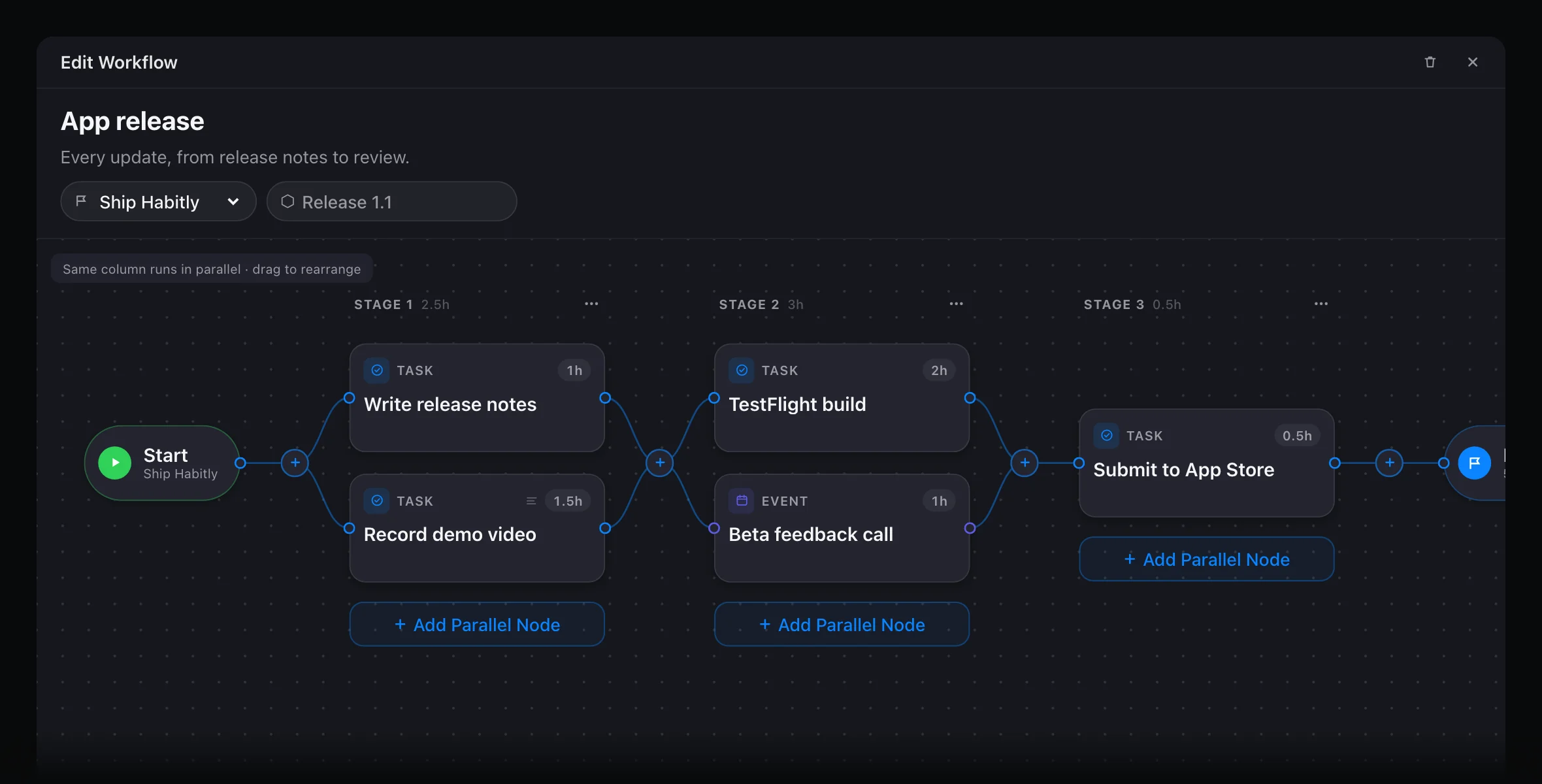
Stages and parallel steps
Same column runs in parallel. Drag a node to another stage or between two to make a new one.
Tasks and events
Each node is a task or an event with its own hour estimate, so the project's total is known up front.
One stage at a time
New todos arrive unscheduled when the stage before them is finished, so the list never runs ahead of the work.
For the things that aren't work toward a goal.
Renew a passport, pay rent, call a friend on their birthday. Vision's Reminder tab keeps dated items apart from your goals, grouped into overdue, today, tomorrow and this week. A reminder can have a time range, a category, and repeat every day, week, month or year. With Flux Pro, reminders with a time range also appear in Apple Calendar.
Not sure how to break it down? Describe it.
Tell Flux AI what you want, like "cook 20 new dishes before spring", and it drafts the goal with a target date, the projects under it and the first todos with suggested times and estimates. Nothing is saved until you tap Save all. The free plan includes a few Flux AI messages a day; Flux Pro makes it unlimited.
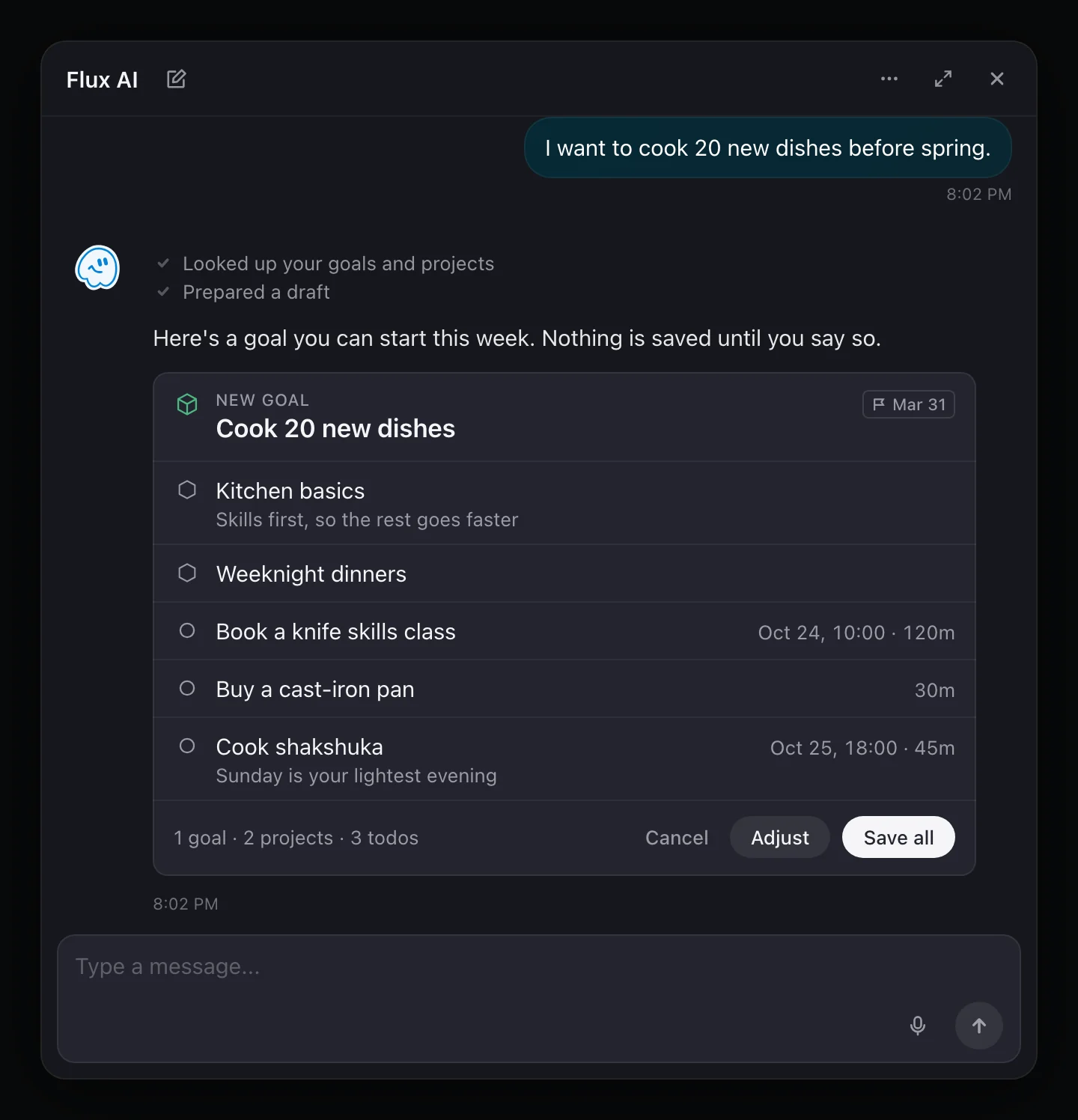
Goal planning with FluxTime
How is a goal planner different from a to-do list?
A to-do list holds the next steps. A goal planner also holds what the steps are for. In FluxTime each todo sits under a project and a goal, with a date range and an hour estimate, so finishing work moves a goal forward and you can see whether the goal is on pace.
How does FluxTime measure progress on a goal?
In hours. Progress is the time you have logged toward a goal divided by its estimated hours. Journal entries count when they are filed under the goal's category or linked to one of its todos. If a goal has no estimate of its own, FluxTime adds up the estimates of its projects and todos.
What does expected progress mean?
It is the share of a goal's date range that has already passed. Halfway between the start and end dates, expected progress is 50%. It appears as a marker on the progress bar, and the percentage turns orange when actual progress trails it by more than five points.
Can I use FluxTime for personal OKRs?
You can set an objective as a goal and its initiatives as projects. FluxTime does not have numeric key results such as revenue or kilometres; progress is always measured in logged hours against an estimate.
Is FluxTime's Vision view a vision board?
No. Vision is FluxTime's goal outline: goals, projects, todos and reminders with dates, estimates and progress. It does not make image collages or affirmations.
Does FluxTime track habits?
There are no habit streaks or check-ins. Repeating things can be reminders that recur daily, weekly, monthly or yearly, and time you spend on them can count toward a goal through the journal.
Is the goal planner free?
Yes. Goals, projects, todos, reminders, workflows, progress and expected progress are free. Flux Pro adds Plan my day, unlimited Flux AI, Apple Calendar integration, cloud sync between devices and the Goal Activity widget.
Goals set the direction. Today does the work.
Vision is where goals live; Today is where their todos get a time. The two share the same tasks, so planning the day keeps every goal in view.
Make progress you can actually see.
Break a goal down, put hours on it, and let the time you spend show how far you've come.
Get FluxTime free