 FluxTime
A full calendar can still be an empty day. Eight hours "at work" is not eight hours of the same capacity: a hard problem that takes forty minutes at 9 a.m. can eat two hours at 3 p.m. Energy decides whether a block of time can hold deep work, admin or rest, and most time trackers never record it.
This guide covers how to track your energy across the day, how to read what you find, and how to act on it. The last part shows how FluxTime does the tracking for you from your time log.
Why track energy as well as time
Time tells you how long you spent. Energy tells you what that time was good for. Two people can log the same 90 minutes and have opposite days: one wrote in a sharp window, the other pushed the same task through a slump and needed an hour to recover.
Tracking energy answers a practical question: when is my most productive time of day? Once you know, you can stop scheduling your hardest work into the hours that can't hold it.
Two ways to track energy
Rate how you feel. A few times a day, stop and score your energy, 1 to 5 or simply high, medium or low. It's direct, and it catches things no log can, like a bad night's sleep. The cost is the interruption, and check-ins tend to fade after a week.
Infer it from what you did. Label the kinds of activity you do as draining, neutral or energising, keep an honest log of your day, and let the pattern build up from the record. It costs nothing extra once you're already logging time, and it keeps working for months. The trade-off: it reflects the kind of work you did in each hour, not how you felt doing it, so the labels have to be honest.
The first is a good way to start. The second is easier to keep up. The audit below uses the first; the FluxTime section uses the second.
A 7-day energy audit
You don't need a wearable. You need a repeatable sample.
For seven days, three or four times a day (on waking, late morning, mid-afternoon and evening):
- Write the time.
- Note what you were doing in the last hour.
- Score your energy from 1 to 5.
- Tag the kind of work: deep focus, meetings, admin, exercise, people, rest.
Rules that keep it honest:
- Score the last 30–60 minutes, not the whole day.
- If a block served two purposes, tag it by what it was mainly for.
- Don't wait for a perfect week. A messy Tuesday is still data.
Reading the results
At the end of the week, line the scores up by time of day and look for repeatable windows, not a personality type. Most people find one band that's reliably high, often late morning, and one reliable trough, often just after lunch. Two questions are worth asking:
- Which hours were high on most days, not just once?
- What was I usually doing in my low hours? Meetings and admin in a trough are fine. Your most important task in a trough is the problem.
One week is enough to move one task. It isn't enough to redesign your life, so treat the result as a first draft and check it again in a month.
How FluxTime tracks your energy
FluxTime takes the second route, so there's no separate energy log to keep. You give each category an energy level once (High Energy, Neutral or Low Energy) and log your day in the journal as usual. Every entry runs until the next one, so the record has no gaps to fill.
The Energy Curve in Review then averages those labels over the time you logged, five minutes at a time, and draws how your energy usually runs across the day:
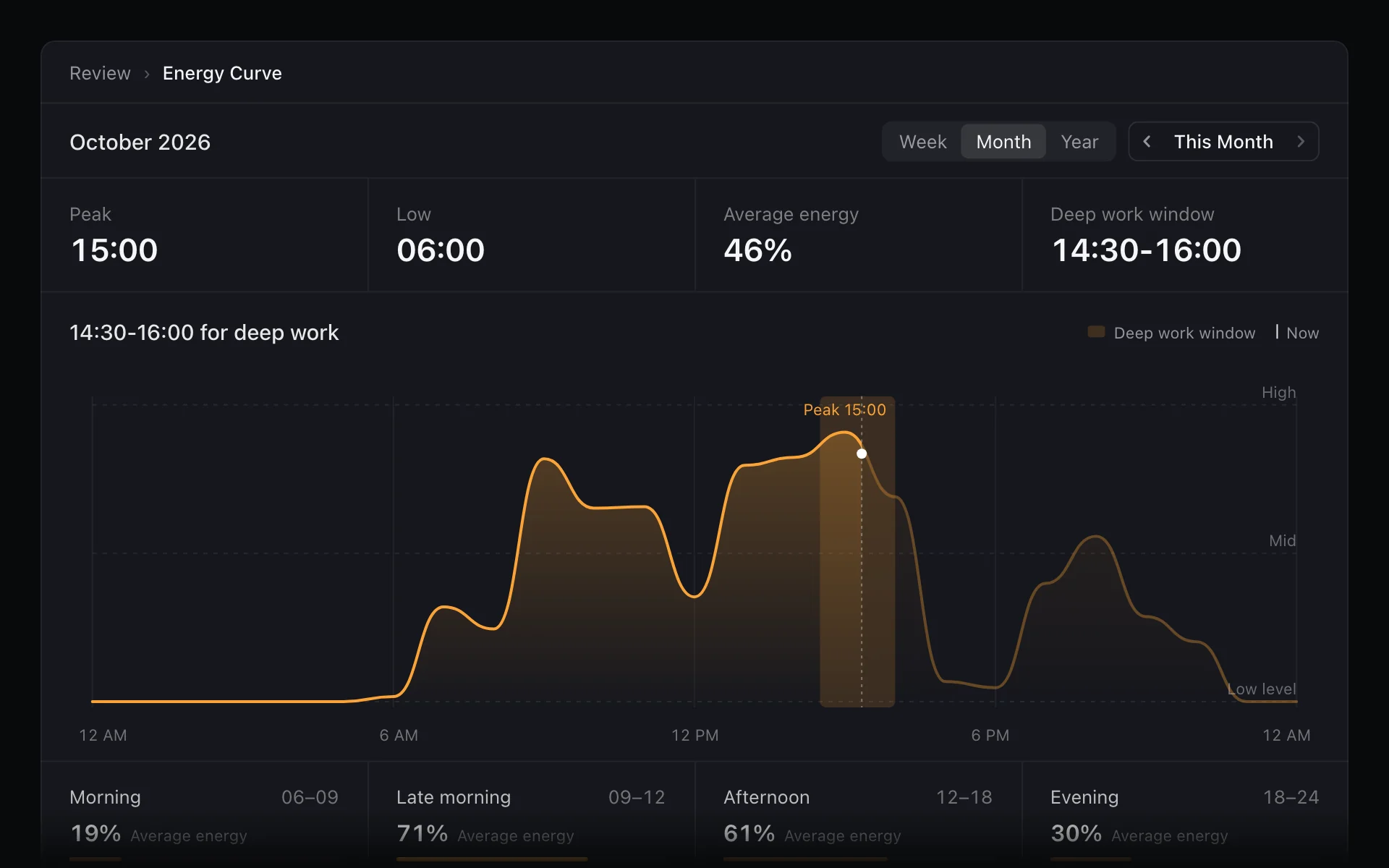
- A deep work window. The best 90 minutes between 06:00 and 22:00, for example "14:30-16:00 for deep work".
- Peak, low and average. The hours that usually run highest and lowest, plus morning, late morning, afternoon and evening side by side.
- Month by month. Step back through earlier months to see whether a new routine moved your peak.
Because the curve comes from your labels, it's worth getting them right: if meetings leave you flat, mark that category Low Energy even if the work matters. Energy Curve is part of Flux Pro. Logging and the rest of the time totals are free. The time tracking page covers everything else Review shows.
Move one task, not your whole day
After a week, or once your curve has a few weeks behind it:
- Pick the most important task that keeps landing in a low hour.
- Move it into your high window.
- Protect that window on the calendar with a time block so meetings don't drift into it.
Hours still matter, and interstitial journaling is a simple way to measure them. Energy decides which hours to give to what. Track both, or the calendar will keep telling you a day was full when it was really just busy.