 FluxTime
Plan on a timeline. Then see what really happened.
Structured is a good visual day planner: your tasks and events on one timeline, ticked off as you go. FluxTime plans the day the same way, then keeps going. A journal records what you actually did, goals move forward with the hours you log, and Review shows where the week went and when your energy runs high.
Timeline, tasks and time blocks/Plus a record of the real day/iPhone, iPad, Mac and Apple Watch
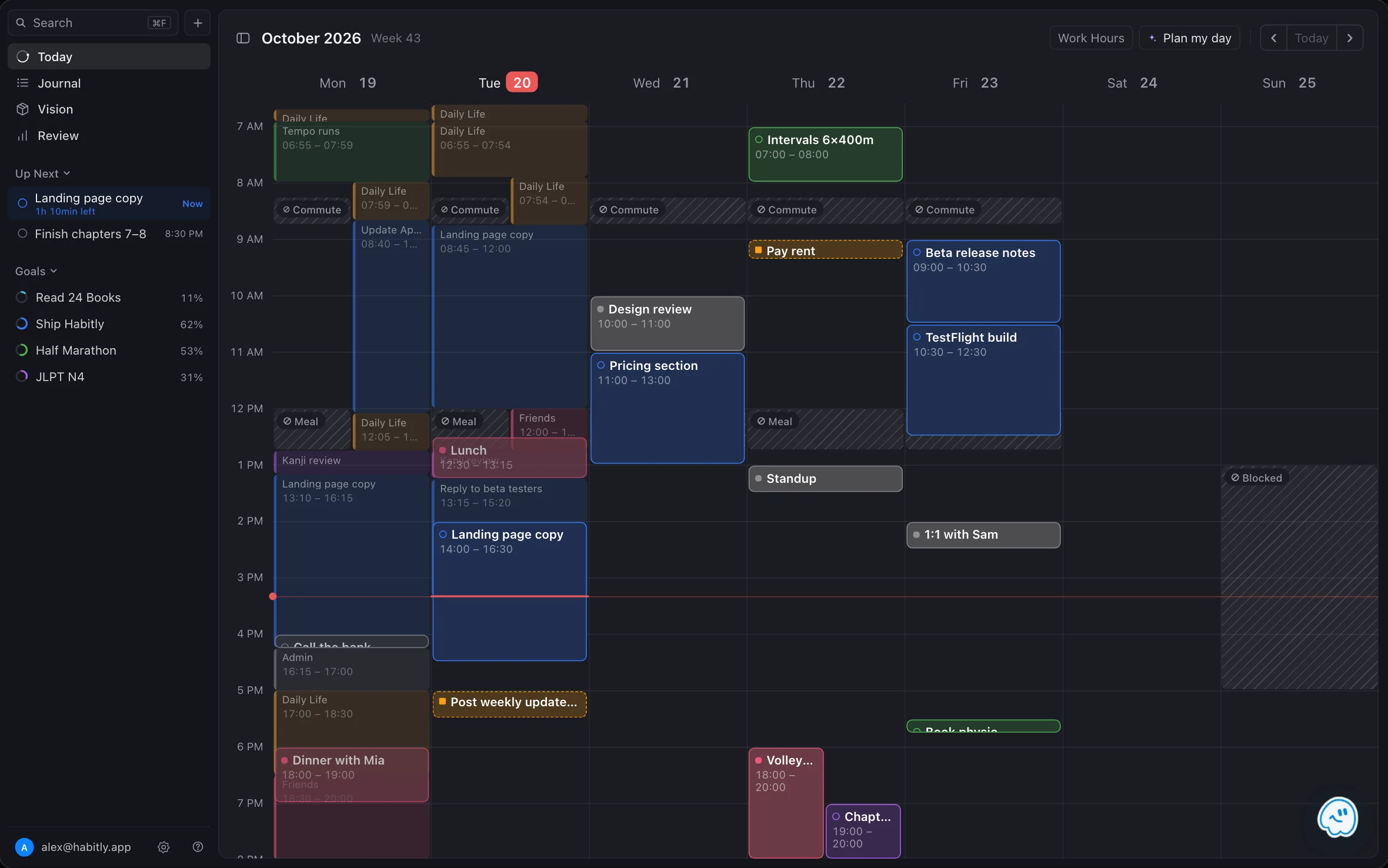
Two planners, two different questions.
Structured answers "what am I doing today?" FluxTime answers that too, and then "what did I actually do, and is it moving my goals?" Which one fits depends on whether you want a plan, or a plan you can check against the real day.
Choose FluxTime if you want to
- 01See the plan and what really happened on the same grid
- 02Know how many hours each part of your life got this month
- 03Give goals an hour estimate and see when they'll be done
- 04Learn when your energy runs high from your own days, without rating your mood
- 05Ask an AI that reads your goals and journal, and approve every change it makes
Structured may suit you better if you
- 01Plan on an Android phone or tablet as well as Apple devices
- 02Want a built-in Pomodoro focus timer
- 03Run your day on recurring tasks and routines
- 04Want to plan only, with no logging at all
- 05Prefer a one-time lifetime purchase to a subscription
FluxTime vs Structured, feature by feature.
Both put your day on a timeline and both have a free plan. The difference is what happens after the plan: FluxTime keeps a record of the day and turns it into totals, goal forecasts and an energy curve.
| Feature | StructuredDay planner | FluxTimePlanner + time log |
|---|---|---|
| Day timeline of tasks and events | Included | Included |
| Unscheduled tasks to drag onto the day | Inbox | Unscheduled tray |
| Time blocks and work hours | As tasks on the timeline | Blocks and daily work hours |
| Calendar integration | With Pro | Apple Calendar, with Pro |
| AI day planning | With Pro | Plan my day with Pro; Flux AI 10 messages a day free |
| Recurring tasks and routines | With Pro | Repeating reminders and reusable workflows |
| Focus timer | Pomodoro | Not included |
| Log what actually happened, shown against the plan | Not included | Included |
| Hours by category, compared with last period | Not included | Included |
| Goals with hour estimates and a finish forecast | Not included | Included |
| Energy | Energy points per task, under a daily limit | Energy Curve from your logged time, with Pro |
| Devices | iPhone, iPad, Mac, Apple Watch, Vision Pro, Android, web | iPhone, iPad, Mac, Apple Watch, web |
| Paid plan | Monthly, yearly or lifetime | $4.99 a month or $39.99 a year |
Structured details are from its App Store listing and help center as of October 2026, and may have changed since. Prices vary by country.
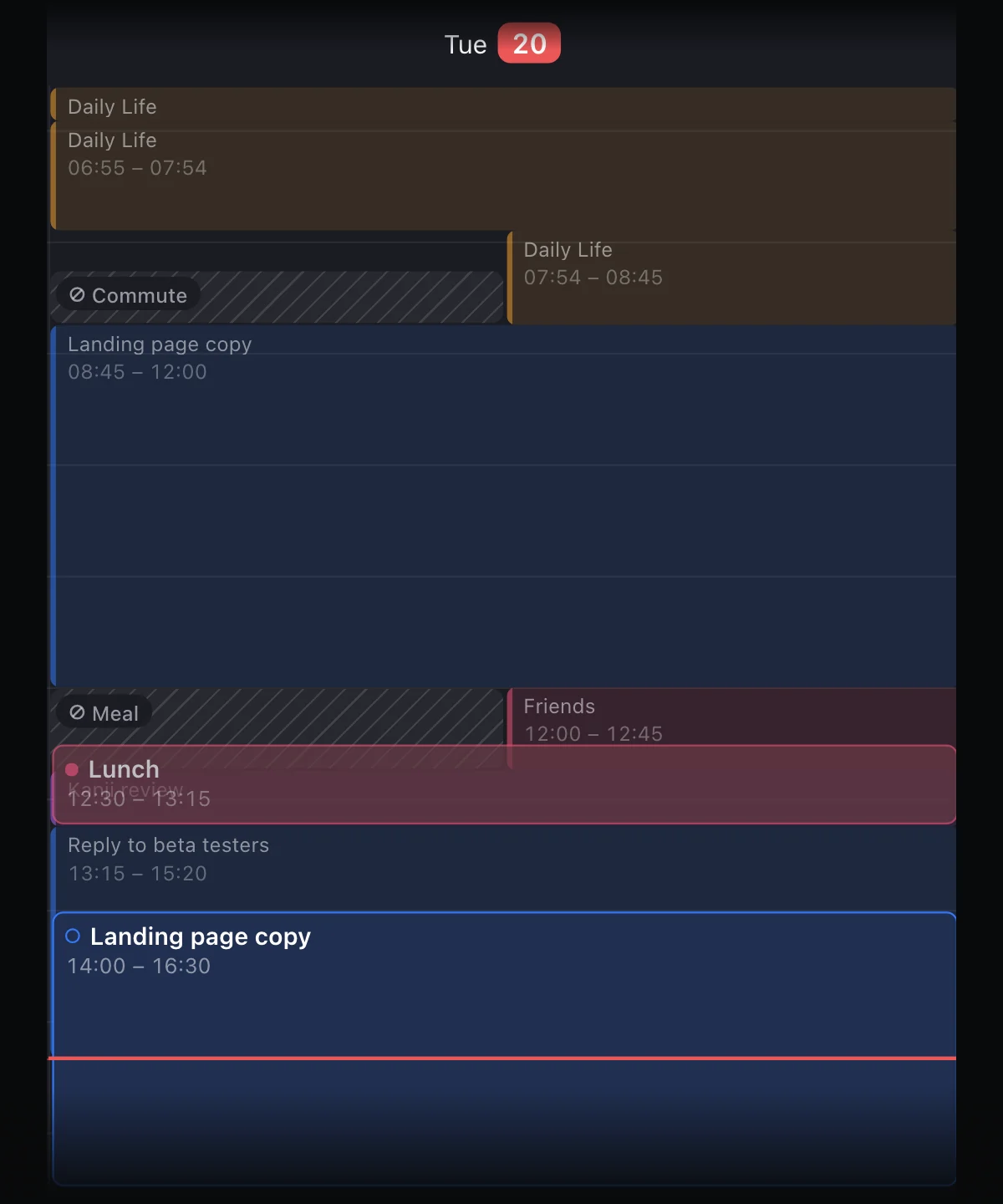
A checked-off task doesn't tell you where the afternoon went.
In a planner, a task is either done or not. FluxTime also keeps a journal: you write a line when you switch to something else, and each entry runs until the next one. That record shows on Today as a quiet wash behind the planned cards, so you can see where the plan held and where the hours went somewhere else.
- 01No timer to start or stop; a missed switch is easy to fix later
- 02Log from iPhone, iPad, Mac Quick Log or Apple Watch
- 03A run or a dinner with friends counts as much as time at your desk
Where the week went, without a spreadsheet.
Once there's a record, FluxTime adds it up. Review splits the week, month or year by your categories, compares each with the period before, and shows how many hours each goal got. With Flux Pro it also scores the week against the balance you chose.
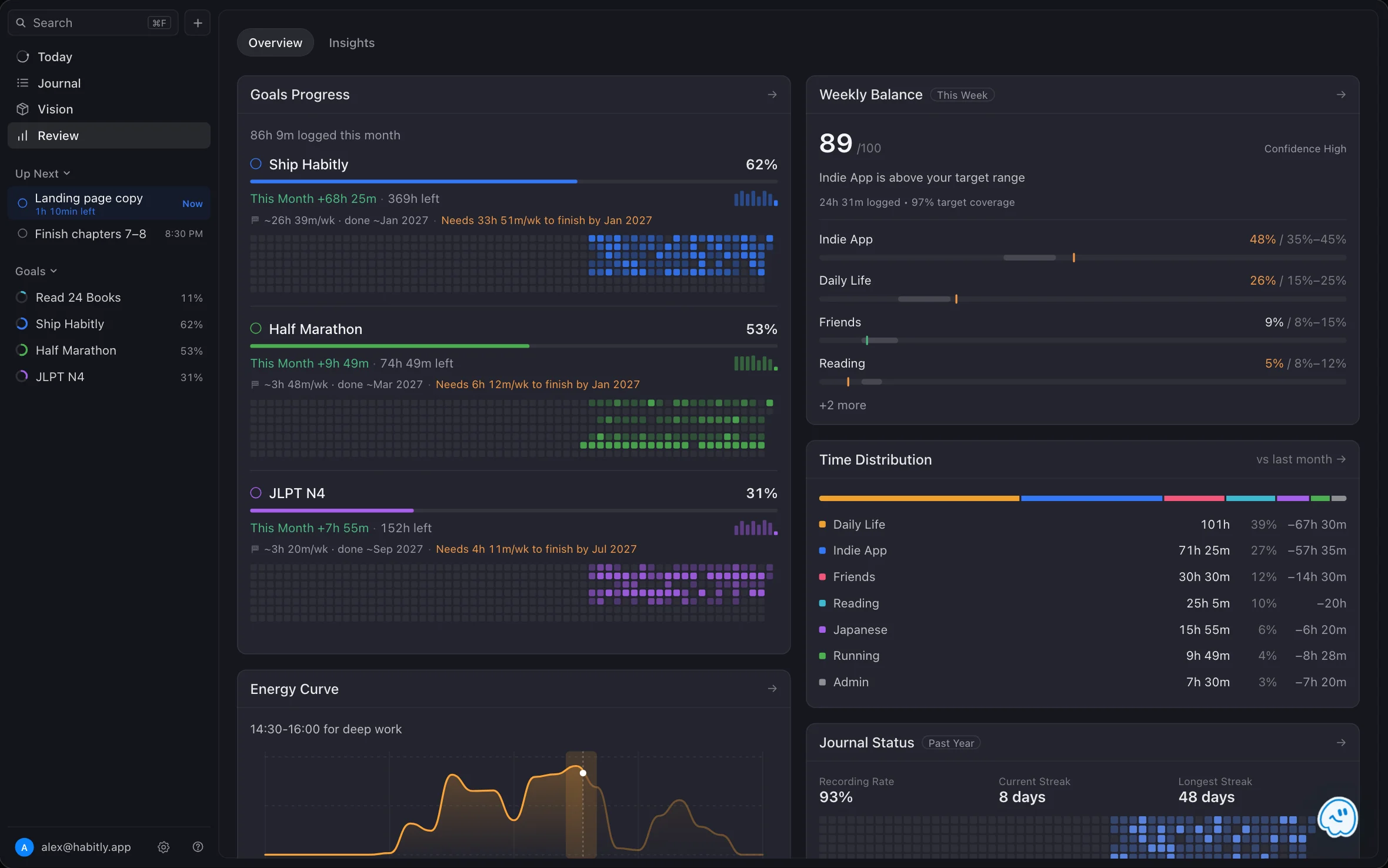
Hours by category
Work, training, family, learning: each one's hours and share, and the change from last period. Time tracking →
Goals that use real hours
Give a goal an estimate, and logged time moves it forward, with a pace and a finish date. Goal planner →
A year at a glance
Journal Status shows your recording rate, streaks and a heatmap of the past year.
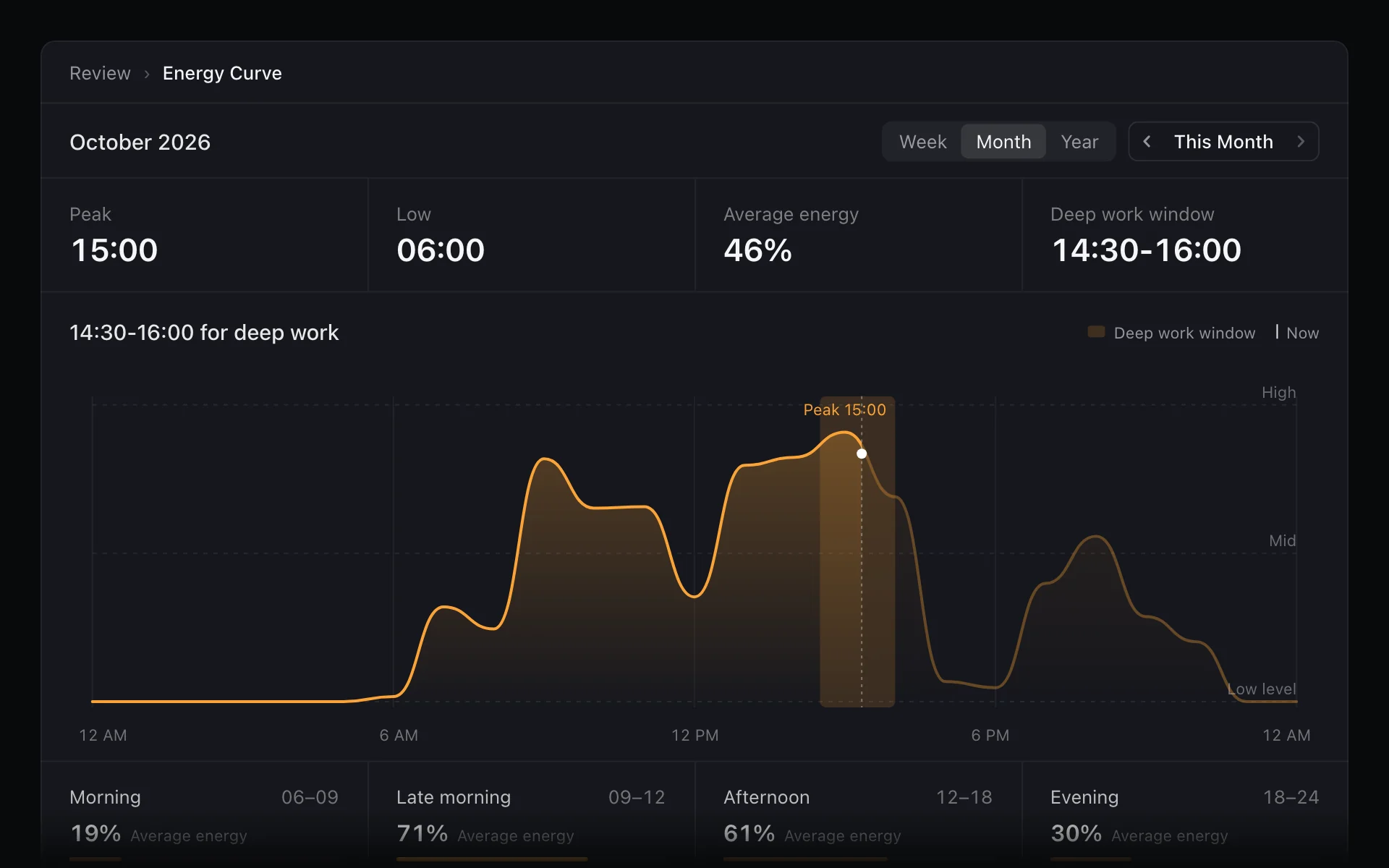
Energy worked out from your days, not budgeted in points.
Structured's Energy Monitor asks you to score tasks and keep the day under a limit. FluxTime works backward from what happened instead. Mark each category High Energy, Neutral or Low Energy once, and the Energy Curve averages it over the time you logged to show when your days usually run high.
- 01Your peak and low hours, morning to evening
- 02The best 90 minutes for deep work, ready to protect with a time block
- 03Month by month, to see whether a new routine moved your peak
Let it draft the day. You approve every change.
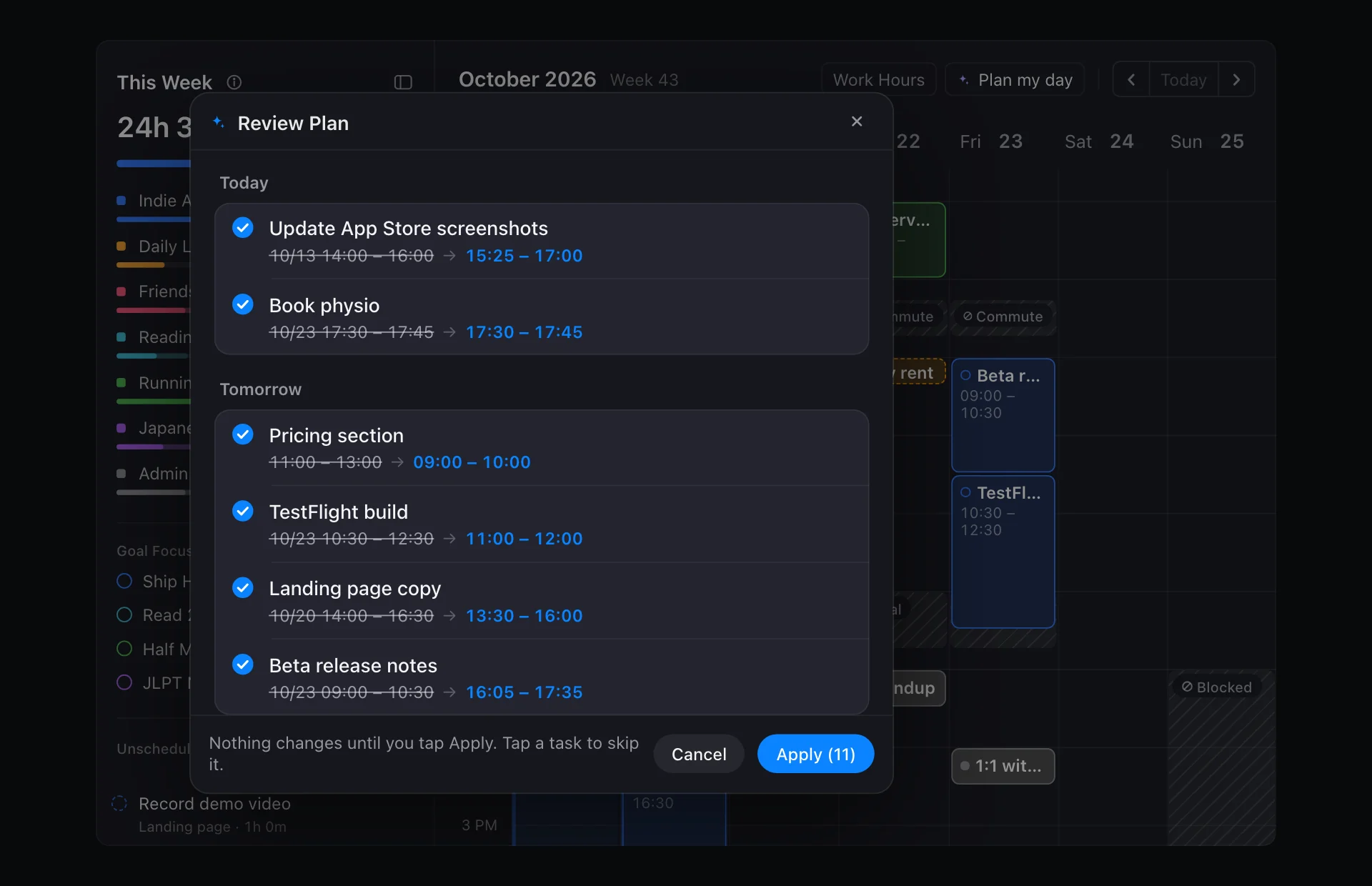
Plan my day fits your tasks into the free time between events and blocks, inside your work hours, most important first. It shows each task's old and new time before anything moves. Flux AI goes further: it reads your goals, tasks, calendar and journal, and can draft new goals, break work down or chart your time on request.
- 01Nothing is saved until you approve it
- 02Tasks that don't fit keep their time instead of being squeezed in
- 0310 Flux AI messages a day free; unlimited with Flux Pro
Moving over takes an evening.
There's no direct importer, but most of what lives in Structured comes across quickly. Calendar events come in through Apple Calendar, and the rest is easier to set up fresh than to copy.
Write down two or three goals
Add them in Vision with a rough hour estimate, then the projects and todos under each.
Connect Apple Calendar
Your events appear on Today next to your tasks. Calendar integration is part of Flux Pro.
Draw your work hours and blocks
Meals, commutes and focus time go on first, so planning stays around them.
Log one ordinary day
Write a line each time you switch. By evening, Review already has something to show.
New to FluxTime? The start guide walks through the first day.
FluxTime as a Structured alternative
Is FluxTime a good alternative to Structured?
If you plan on Apple devices and want more than a plan, yes. FluxTime has a day timeline of tasks, events and time blocks like Structured, and adds a journal of what actually happened, time totals by category, goals with hour estimates and finish forecasts, and an energy curve from your own logged time. If you need an Android app, Structured is the better fit.
Does FluxTime have a visual timeline like Structured?
Yes. Today shows your tasks, calendar events and time blocks on one calendar grid, with unscheduled tasks in a tray you can drag onto the day. The time you record in the journal shows on the same grid, so you can compare the plan with what happened. See the daily planner.
Can I import my tasks from Structured?
There is no direct importer. If your Structured tasks come from Apple Calendar, turn on Apple Calendar in FluxTime and those events appear on Today. Ongoing tasks are quickest to re-create as todos under a goal or project in Vision.
Does FluxTime work on Android or in a browser?
In a browser, yes; on Android, no. FluxTime runs on iPhone, iPad, Mac and Apple Watch, and its web app at fluxtime.io/app works in a desktop browser, including on Windows and Linux, with the same account and data. Keeping the web app in sync with your other devices needs Flux Pro. There is no Android app, so if you plan on an Android phone, Structured covers more of your devices.
How is FluxTime's energy tracking different from Structured's Energy Monitor?
Structured's Energy Monitor asks you to give tasks energy points and keeps the day under a limit you set. FluxTime works backward from your record: each category is marked High Energy, Neutral or Low Energy once, and the Energy Curve averages that over the time you logged to show when your days usually run high and which 90 minutes suit deep work. The Energy Curve is part of Flux Pro.
Is FluxTime free?
Yes. Goals, the Today timeline, time blocks, the journal, the core Review charts and CSV or JSON export are free, along with 10 Flux AI messages a day. Flux Pro adds Plan my day, unlimited Flux AI, the deeper Review charts, cloud sync and Apple Calendar for $4.99 a month or $39.99 a year in the US. See Pricing.
Plan it, log it, review it.
FluxTime is one loop across four views: goals in Vision, a plan in Today, a record in Journal, and the pattern in Review. Each page below covers one part of it.
Plan tomorrow in FluxTime, and see how it really went.
FluxTime is free to download on iPhone, iPad, Mac and Apple Watch. Run it next to Structured for a week and keep the one that tells you more.
Get FluxTime free